MIPAR
  • Products
    • Analysis Software
    • Microscope Software
    • Compliance Software
    • Deep Learning
    • APIs
    • MIPAR for Academics
    • Request a Quote
  • Applications
    • Materials
    • Life Science
    • Manufacturing
    • BioMedical
    • Drone & Survey
    • Recipe Templates
    • Articles & Citations
    • Webinars
  • Spotlight ✧˙˖
  • About
    • Who we are
    • Data Privacy
    • Newsletter
  • User Resources
    • Udemy Course
    • Help desk
    • Forum
    • Tutorials
    • FAQ
    • User Manual
  • Download Trial
  • Home
  • > 
  • Applications
  •  > 
  • Survey
  •  > 
  • Infrastructure

Drone & Survey Infrastructure Imaging with MIPAR

Automating Thermal and Structural Analysis
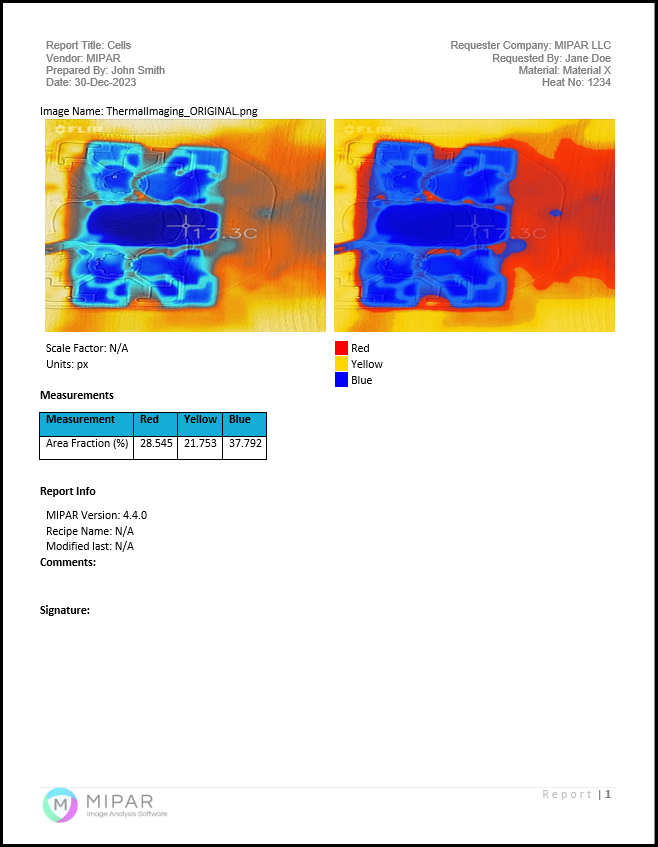
Our goal is clear: to fully automate your infrastructure imaging analysis with both fully automated and supervised workflows. MIPAR streamlines the complex process of analyzing infrastructure data from survey images, eliminating the need for manual interpretation and measurement. Simply upload your infrastructure imaging data, configure your analysis preferences, and quickly generate comprehensive reports detailing the condition and characteristics of your infrastructure, including insights from thermal imaging.
 
Comprehensive Infrastructure Imaging Overview
Infrastructure imaging and analysis are essential for the assessment and maintenance of buildings, roads, bridges, and other critical structures. This analysis is crucial for planning renovations, identifying potential hazards, and ensuring the safety and longevity of infrastructure. MIPAR provides a robust solution for detailed infrastructure imaging and thermal imaging applications, ensuring accurate, data-driven insights.
 
Overcoming Challenges in Infrastructure Imaging and Thermal Analysis
Challenges in infrastructure imaging include handling diverse structural designs, varied materials, and environmental impacts. Manual inspection methods can be inefficient and subject to human error, while conventional automated solutions may lack the detailed and nuanced analysis required for complex infrastructural elements. Thermal imaging presents additional complexities, as detecting temperature variations across surfaces requires high accuracy. MIPAR addresses these challenges efficiently.
 
MIPAR’s Solution for Infrastructure and Thermal Imaging
MIPAR tackles these challenges by combining advanced Deep Learning models with traditional image analysis techniques. Our software proficiently identifies and assesses infrastructural features from survey images, including thermal imaging data. MIPAR accurately measures dimensions, detects structural anomalies, and assesses wear and tear, providing critical insights for maintenance and safety planning through thermal and structural imaging.
 
Advantages of Using MIPAR for Infrastructure Imaging and Thermal Analysis
Utilize MIPAR to save valuable time, minimize human error, and gain a comprehensive understanding of your infrastructure’s condition. Enhance your maintenance and safety planning with data-driven decisions based on accurate and reliable infrastructure imaging and thermal imaging analysis.
 
Who Can Benefit?
MIPAR is ideal for civil engineers, infrastructure managers, and urban planners who require detailed and efficient analysis of infrastructure imaging data, including thermal imaging for temperature variation detection and structural integrity assessments.
 
Technical Details
MIPAR supports a wide range of file types from various surveying instruments and drone cameras, including automated calibration and metadata import features. The software is capable of processing large batches of images and includes a review environment to ensure accuracy in analysis. MIPAR operates on local workstations, providing a secure, internet-independent data processing environment.​

System Requirements
Documentation >>

Demo
Discover MIPAR's capabilities in infrastructure survey analysis. Schedule a demo with one of our Applications Engineers to see how our software can transform your approach to infrastructure assessment and planning.

Support
Our team of Applications Engineers, with their extensive expertise in structural analysis and automated image processing, is dedicated to assisting you in your infrastructure survey projects. Our support team offers comprehensive assistance to ensure you fully leverage MIPAR's capabilities.

Cost
Licensing costs vary depending on the type of license and the number of users. For specific pricing information tailored to your infrastructure survey analysis needs, please submit a quote request, and a representative will respond promptly.

QUOTE
Sample Aluminum Grain Size Report


Picture

Check Out Our Products

Picture

MIPAR Base: our core product to analyze images from almost any source. Extensions enable Deep Learning models, Word reports and 3D data analysis.  MIPAR Base Page >>

Picture

​Microscope Software: capture, analyze and report all in a single workflow with MIPAR Live. Check to see if your camera is supported. MIPAR Live Page >> ​​

Picture

Compliance Software: analyze, report, and approve in a 21 CFR Part 11 or GMP Annex 11 compliant environment with traceability. MIPAR Checkpoint Page >> ​​

Picture

MIPAR APIs: tools to help integrate MIPAR detection and measurement solutions into other software applications and workflows. APIs Page >> ​​​

Picture

Call

Give us a call
​Mon-Fri 9am-6pm EST​​
​​+1-614-407-4510

Message

Tell us how we can help!

Chat

Chat with us
​Mon-Fri 9am-6pm EST​​
Chat with us ››

Home

Support

Contact

© 2026 |  Privacy  |  Terms
  • Products
    • Analysis Software
    • Microscope Software
    • Compliance Software
    • Deep Learning
    • APIs
    • MIPAR for Academics
    • Request a Quote
  • Applications
    • Materials
    • Life Science
    • Manufacturing
    • BioMedical
    • Drone & Survey
    • Recipe Templates
    • Articles & Citations
    • Webinars
  • Spotlight ✧˙˖
  • About
    • Who we are
    • Data Privacy
    • Newsletter
  • User Resources
    • Udemy Course
    • Help desk
    • Forum
    • Tutorials
    • FAQ
    • User Manual
  • Download Trial